How to Use TEXTJOIN in Excel
Introduction
Excel has many functions that make working with data easier. One of them is TEXTJOIN, which lets you combine values from multiple cells into one, separated by a character you choose. It's helpful when you need to pull information together without using long formulas or manual edits.
What is TEXTJOIN?
The TEXTJOIN function makes it easy to combine text from different cells or ranges. Instead of using multiple CONCAT or & formulas, TEXTJOIN lets you choose a delimiter, such as a comma or space, and gives you the option to skip over empty cells.
The syntax is:
=TEXTJOIN(delimiter, ignore_empty, text1, [text2], ...)
- delimiter: A string or character inserted between each text value.
- ignore_empty: TRUE or FALSE. Determines whether empty cells should be ignored.
- text1, text2, ...: The text items or ranges to be joined.
TEXTJOIN in Action
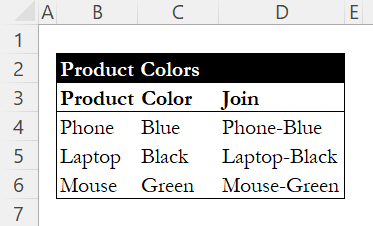
Consider a dataset containing products with their colors, and you want to concatenate these values into a single cell with a hyphen separating each one.

To achieve this, enter the following formula in cell D4:
=TEXTJOIN("-", TRUE, B4:C4)

Here is a breakdown of the formula:
- "-": Specifies the hyphen as the delimiter between each value.
- TRUE: Indicates that empty cells should be ignored.
- B4:C4: The range of cells containing the values to be joined.
Copy this formula down to apply it to the other rows, resulting in the following concatenated outputs:
Conclusion
The TEXTJOIN function is a straightforward way to combine text from multiple cells. You can choose a delimiter, skip blank cells, and quickly create cleaner outputs from your data. It's especially useful for consolidating information or building reports, and once you get comfortable with it, it can save time on repetitive tasks.
For more ways to work with your data, check out our guide on UNIQUE to extract distinct values from a range, or learn how to extract parts of text with LEFT, RIGHT, and MID.
Learn Excel by doing
Bite-sized lessons, drills, and daily challenges to build real spreadsheet skills.