How to Use SUMIFS in Excel (With Examples)
Introduction
The SUMIFS function in Excel lets you add numbers that meet more than one condition. It's useful when you want totals that depend on multiple factors, like product and region, or date and category. This article explains the syntax and walks through a simple example.
Syntax of the SUMIFS Function
The syntax for the SUMIFS function is as follows:
=SUMIFS(sum_range, criteria_range1, criteria1, [criteria_range2, criteria2], ...)
- sum_range: The range of cells to sum.
- criteria_range1: The range of cells that you want to apply the first criterion against.
- criteria1: The condition that must be met in the first criteria range.
- [criteria_range2, criteria2]: Additional criteria ranges and conditions (optional).
Example Scenario
Consider a sales dataset that tracks quarterly sales by region and product type. The dataset might look like this:
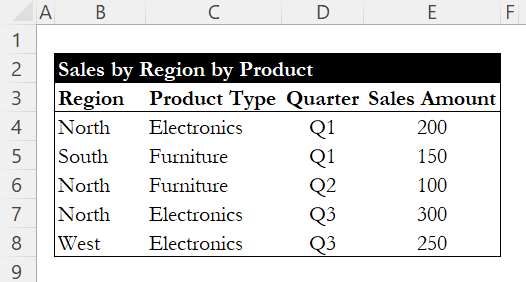
Suppose you want to calculate the total sales for Electronics in the North. This scenario can be effectively handled using the SUMIFS function.
Constructing the SUMIFS Formula
To achieve this, the formula would be structured as follows:
=SUMIFS(E4:E8, B4:B8, "North", C4:C8, "Electronics")
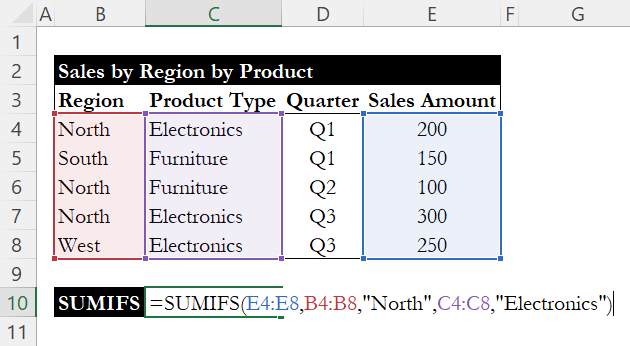
In this formula:
E4:E8is the sum_range, representing the Sales Amount.B4:B8is the first criteria_range, corresponding to the Salesperson column."North"is the first criteria, indicating we are interested in North region.C4:C8is the second criteria_range, which corresponds to the Product Type."Electronics"is the second criteria, specifying the product category of interest.
Evaluating the Result
When we press enter, Excel evaluates the specified conditions. It checks for entries where the Region is "North" and the Product Type is "Electronics." The qualifying entries in the dataset are:
- North, Electronics, Q1, 200
- North, Electronics, Q3, 300
The SUMIFS function sums these amounts, yielding a total of 500.

Conclusion
The SUMIFS function is helpful when you need to add values that meet more than one condition. With just a simple formula, you can pull totals by category, region, or time period without extra steps. It's a practical tool for tasks like sales tracking or financial reporting, and once you get used to it, it becomes a regular part of data analysis.
If you're working with single-condition calculations, check out our guide on COUNTIF and SUMIF for simpler conditional formulas. For conditional max and min values, see our guide on MAXIFS and MINIFS.
Learn Excel by doing
Bite-sized lessons, drills, and daily challenges to build real spreadsheet skills.