5 Helpful Finance Excel Functions: NPV, IRR, and More
Introduction
Excel has built-in functions for the most common financial calculations. This guide covers five of them: NPV, IRR, PMT, FV, and XNPV.
1. NPV (Net Present Value)
The syntax is:
=NPV(rate, value1, [value2], ...)
- rate: The discount rate over one period.
- value1, [value2], ...: The series of future cash flows.
The NPV function calculates the present value of a series of cash flows based on a specific discount rate. It is widely used in capital budgeting to assess the profitability of an investment.
Suppose you expect to receive cash flows of $10,000, $15,000, and $20,000 over the next three years.
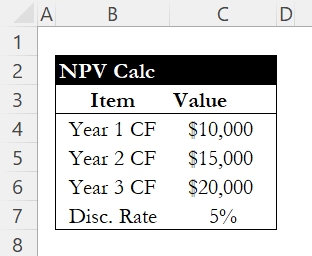
If the discount rate is 5%, the NPV can be calculated as follows:
=NPV(C7, C4, C5, C6)
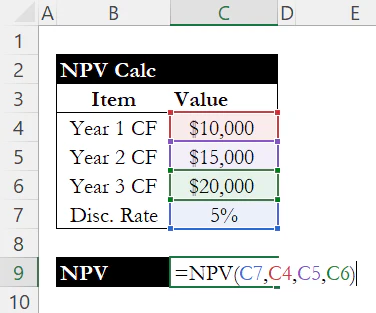
The result will give you the present value of these future cash flows, allowing you to evaluate whether the investment is worthwhile.

2. IRR (Internal Rate of Return)
The syntax is:
=IRR(values, [guess])
- values: A range of cells containing the cash flows (must include at least one negative and one positive value).
- [guess]: (Optional) An initial estimate for the rate of return.
The IRR function estimates the internal rate of return for a series of cash flows. It is a key metric in financial decision-making, indicating the profitability of an investment.
Let's assume we have cash flows of -$25,000 (initial investment), $10,000, $15,000, and $20,000.
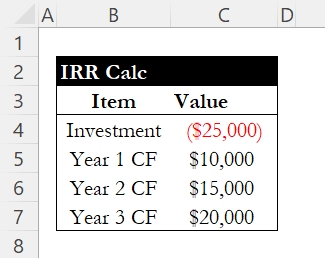
IRR can be calculated with:
=IRR(C4:C7)
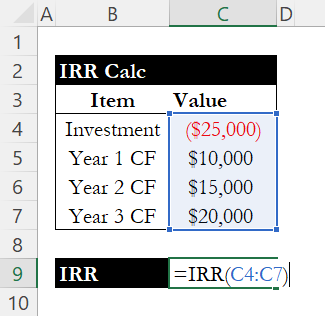
Where C4 through C7 contain the values: -25000, 10000, 15000, 20000. The result will be the annualized rate of return for the investment.

3. PMT (Payment)
The syntax is:
=PMT(rate, nper, pv, [fv], [type])
- rate: The interest rate per period.
- nper: The total number of payment periods.
- pv: The present value (loan amount).
- [fv]: (Optional) The future value after the last payment.
- [type]: (Optional) When payments are due (0 = end of period, 1 = beginning).
The PMT function calculates the payment for a loan based on constant payments and a constant interest rate. This is particularly useful for calculating mortgage payments or installment loans.
Assume someone took out a loan of $100,000 at an annual interest rate of 4% for 30 years.
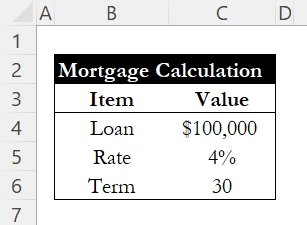
The monthly payment can be calculated as follows:
=PMT(C5/12, C6*12, -C4)
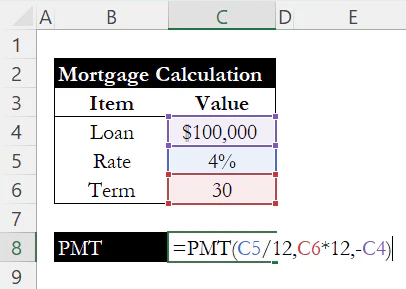
The negative sign before the loan amount indicates a cash outflow. The result will show the monthly payment required to pay off the loan.

4. FV (Future Value)
The syntax is:
=FV(rate, nper, pmt, [pv], [type])
- rate: The interest rate per period.
- nper: The total number of payment periods.
- pmt: The payment made each period.
- [pv]: (Optional) The present value of the investment.
- [type]: (Optional) When payments are due (0 = end of period, 1 = beginning).
The FV function calculates the future value of an investment based on periodic, constant payments and a constant interest rate. This is useful for retirement planning and investment forecasting.
Let's say you invest $500 monthly in an account that earns an annual interest rate of 6% for 20 years.

The future value can be calculated as:
=FV(C5/12, C6*12, -C4)
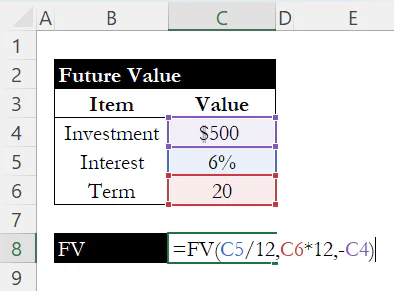
The result will show the total value of the investment at the end of the period.

5. XNPV (Extended Net Present Value)
The syntax is:
=XNPV(rate, values, dates)
- rate: The discount rate to apply.
- values: A range of cash flows.
- dates: A range of dates corresponding to each cash flow.
The XNPV function calculates the net present value of cash flows that occur at irregular intervals. It provides a more precise analysis than the standard NPV function.
Consider cash flows of -$30,000, $10,000, $15,000, and $25,000 occurring on different dates.
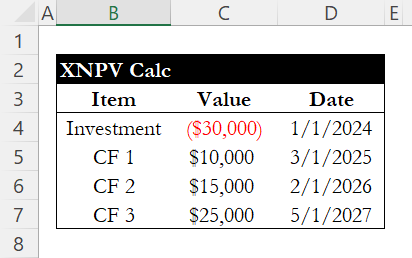
The XNPV can be calculated as:
=XNPV(5%, C4:C7, D4:D7)

This formula will yield the present value of cash flows based on their specific dates and the given discount rate.

Conclusion
These five functions (NPV, IRR, PMT, FV, and XNPV) are critical tools for financial analysts. They provide essential insights into investment profitability, loan payments, and future value projections.
For a deeper look at individual functions, check out our guide on the PMT function for detailed payment calculations, or see how to calculate a firm's blended cost of capital with our WACC guide.
Learn Excel by doing
Bite-sized lessons, drills, and daily challenges to build real spreadsheet skills.